

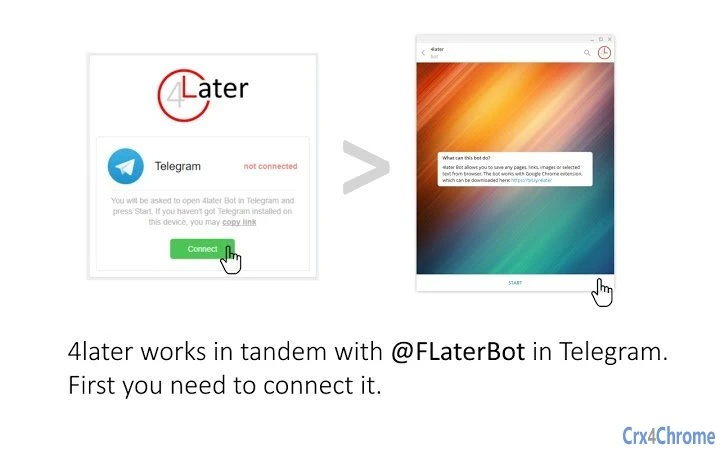
Description
Save Web Content to Telegram Instantly
Overview
The Save to Telegram extension is a productivity-focused desktop utility designed to streamline the process of saving online content. It enables users to capture web pages, articles, links, images, or selected text directly into a personal one-to-one chat with the FLaterBot on Telegram. This seamless integration eliminates the need for additional account creation or registration, as long as the user already has a Telegram account. The tool is particularly useful for individuals who rely on cross-device synchronization for content management, such as researchers, writers, and digital organizers.
By leveraging Telegram’s built-in message synchronization across mobile, web, and desktop platforms, the extension ensures that saved content remains accessible from any device. This functionality supports a continuous workflow, allowing users to collect information on one device and retrieve it on another without manual transfers. The software is tailored for professionals and consumers seeking a lightweight, no-friction solution to manage online resources efficiently. Its simplicity and reliance on an existing messaging platform make it ideal for users who prioritize speed, security, and minimal setup.
Key Features & Capabilities
- Instant Web Clipping – Capture any visible web content with a single click, including full pages, articles, links, images, or highlighted text.
- Telegram Integration – Automatically sends saved content to a private one-to-one chat with the FLaterBot, ensuring secure and organized storage.
- Multi-Platform Sync – Content saved via the extension is synchronized across all devices where Telegram is installed, including Windows, Mac, Linux, mobile, and web.
- No Registration Required – Users can begin saving content immediately if they already have a Telegram account, eliminating onboarding friction.
- Lightweight Design – The extension has a minimal footprint of 1.5 MB, ensuring fast installation and low system impact.
Real-world use cases include saving research materials for later review, archiving articles during online browsing, or collecting visual references for creative projects. The tool’s ability to preserve context and formatting enhances usability, especially when retrieving content across different devices. By integrating with a widely used messaging platform, it reduces the need for third-party note-taking or bookmarking tools.
User Interface, Workflow & Performance
The extension features a clean, minimal interface designed for quick access and ease of use. It integrates directly into the browser’s toolbar, allowing users to trigger the save function with a single click. The workflow is streamlined: selecting content, clicking the extension icon, and confirming the send to Telegram. No additional configuration steps are required during initial use.
Navigating between the browser and Telegram is intuitive, with minimal disruption to the user’s current task. The extension operates in the background, and the developer did not specify resource usage details. Performance observations are based on general software behavior patterns. The tool is expected to maintain low CPU and RAM usage due to its lightweight nature and reliance on existing Telegram infrastructure. Stability appears to be consistent, as the extension functions through a well-established messaging platform with proven reliability.
Compatibility & System Requirements
The extension is compatible with Windows, Mac, and Linux operating systems, making it accessible to a broad user base. It is designed to function as a browser-based tool, with support for major web browsers on these platforms. The installation size is 1.5 MB, indicating a compact and efficient deployment. The developer did not provide additional system requirements, such as minimum RAM, processor specifications, or browser versions.
Exact system requirements were not listed. Compatibility information was partially provided. Users should ensure their system supports the latest versions of supported browsers to maintain optimal functionality. The tool does not require administrative privileges for installation, which enhances accessibility for standard user accounts.
Pros and Cons
Pros
- Zero registration required—works immediately with existing Telegram accounts.
- Seamless cross-device synchronization via Telegram.
- Lightweight at just 1.5 MB with minimal system impact.
- Simple, fast, and intuitive workflow for saving web content.
- Secure transmission through Telegram’s encrypted messaging.
Cons
- Requires a Telegram account to function—unsuitable for users without one.
- Dependent on Telegram’s infrastructure; any service disruption may affect functionality.
- Limited customization options for saving preferences or organization.
- No built-in search or tagging system within the extension.
- Performance details such as CPU or RAM usage were not specified.
FAQ Section
Is the extension free to use?
Yes, the extension is available at no cost. There are no subscription fees or hidden charges.
Does the extension require a Telegram account?
Yes, the extension requires an existing Telegram account to function. It sends saved content to a private chat with the FLaterBot, which is only accessible to the user.
Can I use this on multiple devices?
Yes, since Telegram synchronizes messages across all platforms, saved content can be accessed from any device where Telegram is installed, including mobile, web, and desktop applications.
Is my saved content secure?
Yes, the extension uses Telegram’s end-to-end encryption for messages sent to your personal chat. Content is stored only in your private chat and is not accessible to third parties.
How often does the extension update?
Updates are released by the developer as needed. The current version is 1.0.0, and users are encouraged to keep the extension up to date for optimal performance and security.
Final Thoughts + CTA
The Save to Telegram extension delivers a focused, efficient solution for users seeking a fast and secure way to save online content. Its reliance on Telegram’s robust synchronization network ensures that saved materials are always within reach, regardless of the device being used. The absence of registration, combined with a lightweight design and intuitive workflow, makes it a compelling choice for professionals and casual users alike.
While it is limited to Telegram users and lacks advanced organizational features, its simplicity and reliability outweigh these constraints for many. The tool excels in speed, security, and cross-platform consistency, offering a frictionless experience that fits seamlessly into daily workflows.
For anyone already using Telegram and looking to enhance their content-saving process, this extension is a must-have. Download Save to Telegram Extension now.
Guides & Tutorials for 4Later Extension for Chrome
How to install 4Later Extension for Chrome
- Click the Preview / Download button above.
- Once redirected, accept the terms and click Install.
- Wait for the 4Later Extension for Chrome download to finish on your device.
How to use 4Later Extension for Chrome
This software is primarily used for its core features described above. Open the app after installation to explore its capabilities.
User Reviews for 4Later Extension for Chrome 0
No reviews found





